Screen guide
The Usual week screen
At a glance
- Purpose
- Say once which days and hours each housekeeper usually works, so every day starts with the right people on shift.
- Who uses it
- Owner
- Manager
- Housekeeping
- Where to find it
- Menu, Settings, then Usual week. The three-dot menu of the housekeeping board opens it too.
The days and hours each person normally works. “On shift today” in housekeeping starts from this.
The screen
Section titled “The screen”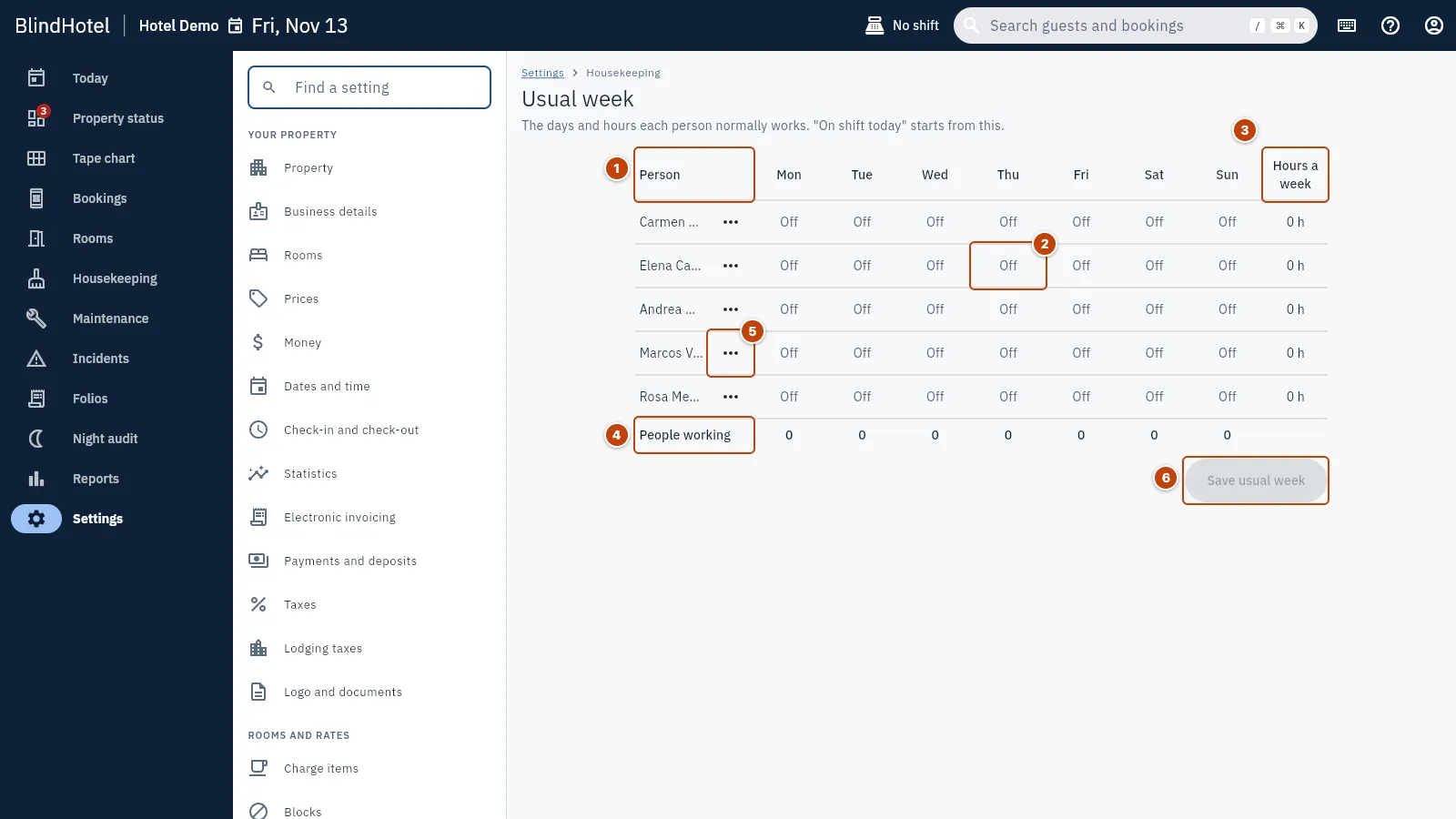
Parts of the screen
Section titled “Parts of the screen”- Person: one row for each person who cleans rooms.
- A day: one cell for each person and day. It says Off, or the hours, for example 8 h.
- Hours a week: the total of each person.
- People working: for each day, how many people are on.
- Copy week to…: copies the days and hours of a person to others.
- Save usual week: keeps the changes.
Options and filters
Section titled “Options and filters”- The page has no filters. A person who is not a housekeeper does not appear here: give someone the Housekeeper role in Staff first.
- A cell shows Off, On, set hours (the person works but has no hours yet) or the number of hours.
Actions
Section titled “Actions”- Tap a day (Owner, Manager, Housekeeping supervisor): opens the window of that person and day. From and To set the hours and Set hours keeps them. Mark as off makes the day free.
- Use the same hours on (Owner, Manager, Housekeeping supervisor): in that window, tick other days to give them the same hours at once.
- Copy week to… (Owner, Manager, Housekeeping supervisor): pick the people who get the same week. Their days and hours replace what they had. Tap Copy.
- Save usual week (Owner, Manager, Housekeeping supervisor): keeps everything. Until you tap it the page says You have changes that are not saved.
Colours, icons and badges
Section titled “Colours, icons and badges”- Hours marked in red are wrong: a shift ends after it starts, or only one of From and To is filled in. Fix them before saving.
- The totals row and column update as you change a cell.
Phone and desktop
Section titled “Phone and desktop”- When there is room it is a table with a column for each day. On a narrow screen, such as a phone, each person is a card with the seven days.
Common questions
Section titled “Common questions”- Does this change today’s shifts? No. It is where each day starts from. To change one day only, use On shift today on the housekeeping board.
- Why is the page empty? Nobody cleans rooms yet. Give someone the Housekeeper role in Staff, then set the days they usually work.
- Can two people have the same week? Yes. Set one and use Copy week to….