Process guide
Housekeeper
TimeYour shift
- Housekeeping
DifficultyEasy
The housekeeper’s day: clean your rooms in order, mark each one as you go and tell the team what you find.
Purpose
Section titled “Purpose”Your rooms are clean in the order the guests need them, and the supervisor and the front desk know how each one stands.
Ingredients
Section titled “Ingredients”- Permissions: the Housekeeper role.
- Information: your rooms for today. The supervisor shares them each morning.
- Documents: on a computer or a tablet, Print my day prints your rooms, their notes and the trolley list.
- State: the supervisor has shared today’s rooms. If your list says “No rooms for you yet today.”, ask them to use Plan the day.
Expected result
Section titled “Expected result”Every one of your rooms is marked Done, and the line on top shows all of them done.
-
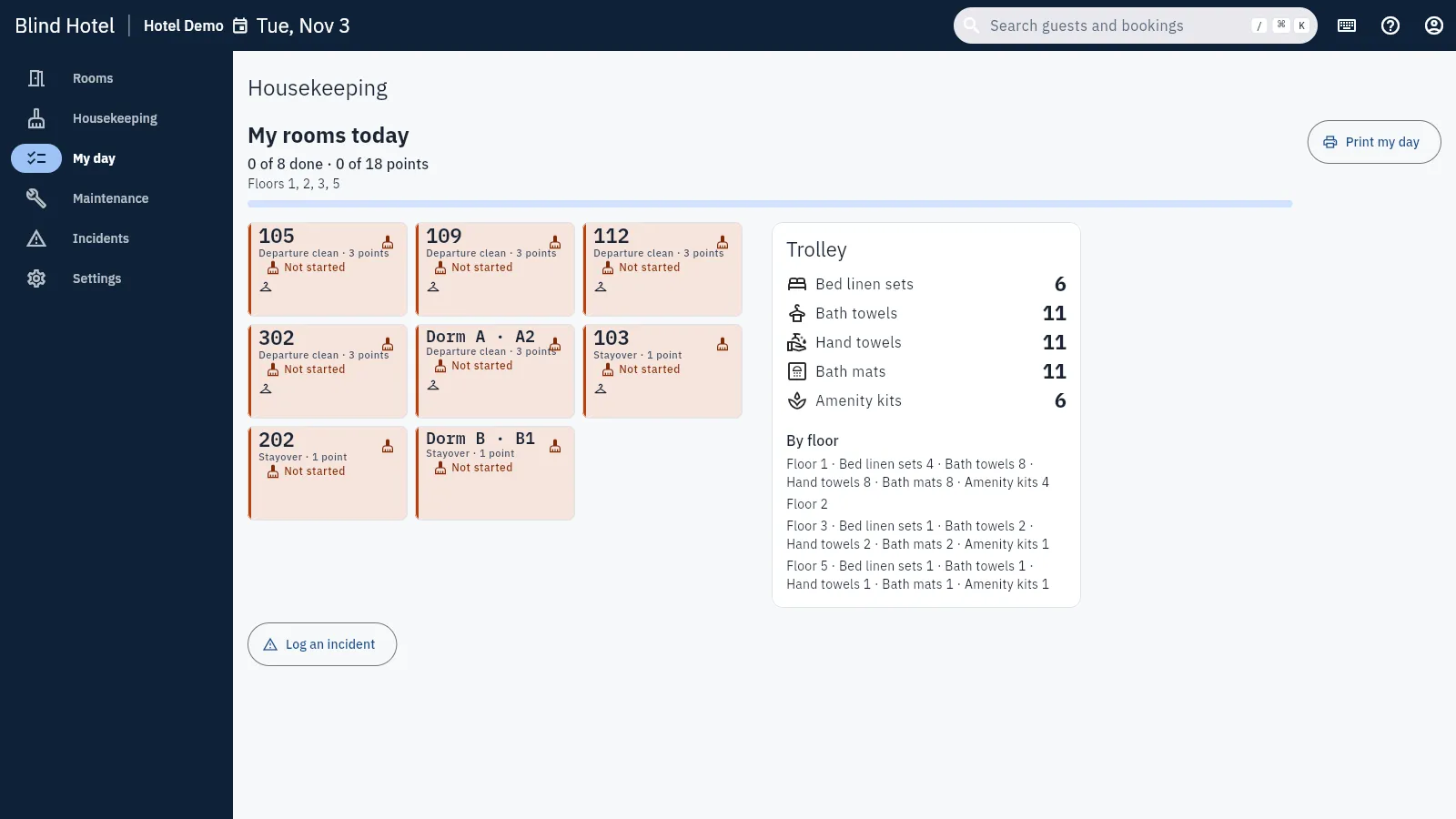
Sign in. You land on My day. The top shows how many rooms and points you have done, for example “3 of 7 done · 12 of 19 points”.
-
Look at Trolley and load what it lists for your rooms: bed linen sets, towels, bath mats and amenity kits. If it says “Nothing to load: no linen to change today.”, there is nothing to load.
-
Take the first room of the list. The list is already in the order to work: a rush first, then rooms with an arrival today, then the rest. Read the card: the kind of clean, the notes and marks such as Linen change.
-
Tap Start. A departure clean waits until the guest has checked out: the card says “Waiting for the guest to check out.” A room with Do Not Disturb waits too.
-
Clean the room.
-
Tap Done. A message says the room is clean for ten seconds, with Undo if you tapped by mistake.
-
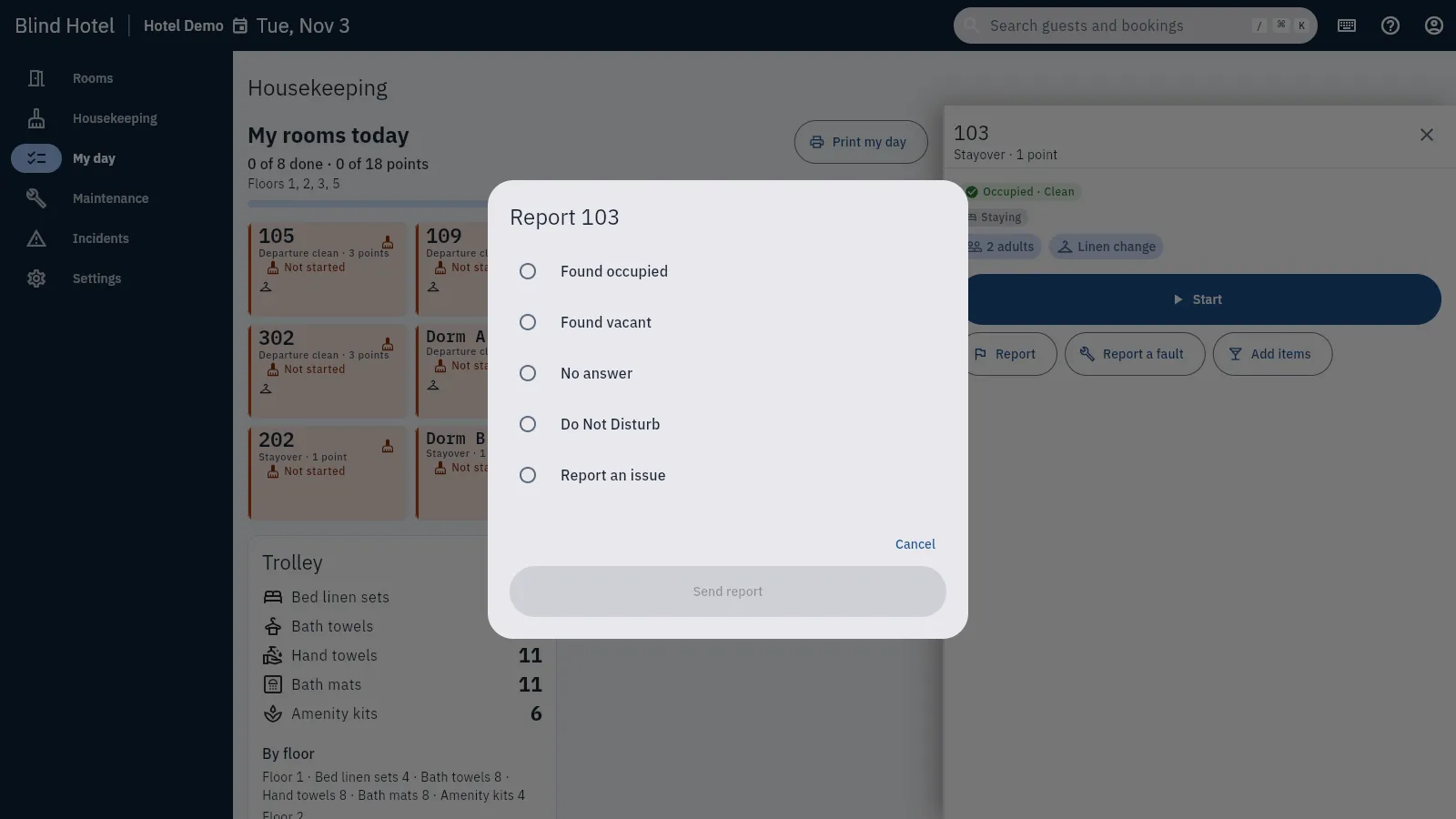
If you find something in the room, tap Report. Choose Found occupied, Found vacant, No answer, Do Not Disturb (only on an occupied room) or Report an issue, add a Note (optional) and tap Send report.
-
If something is broken, tap Report a fault. Choose how urgent it is, add a note and tap the kind of fault, such as Plumbing.
-
If the guest of an occupied room used the minibar, tap Add items (where your hotel lets attendants charge). Tap the plus of each item and then Charge to the room.
-
If something unusual happens, tap Log an incident, under your rooms. See Report an incident.
-
Go on with the next room until the line on top says all your rooms are done.
Check your work
Section titled “Check your work”No card says Saving…: every tap has reached the server. The line on top shows all your rooms and points done. On a phone the finished rooms fold under Done with their number. A red note “Sent back:” on a card means the supervisor found something missing: clean that room again.
What next
Section titled “What next”- Rooms you finish go to the supervisor. Where the hotel inspects, they are checked first. See Housekeeping supervisor.
- Every button of the screen is in The My day screen.
- If the connection drops, see If the internet is down.
Considerations
Section titled “Considerations”- A room marked Rush is a guest waiting: do it first.
- On a phone, Cleaning in the bottom bar opens the same list, and More has the rest. You do not need them to do your day.
- If the connection drops, Start, Done and Report wait on your phone, and the card says Saving… until they get through. Add items and Report a fault need the connection at that moment.