Screen guide
The Prices screen
At a glance
- Purpose
- Set what a night costs, how it changes by date and for whom, and when it can be sold.
- Who uses it
- Owner
- Manager
- Where to find it
- Menu, Settings, then Prices
Everything about what a night costs, in four numbered steps: the normal price, the changes by date, the plans for channels and agencies, and the selling rules.
The screen
Section titled “The screen”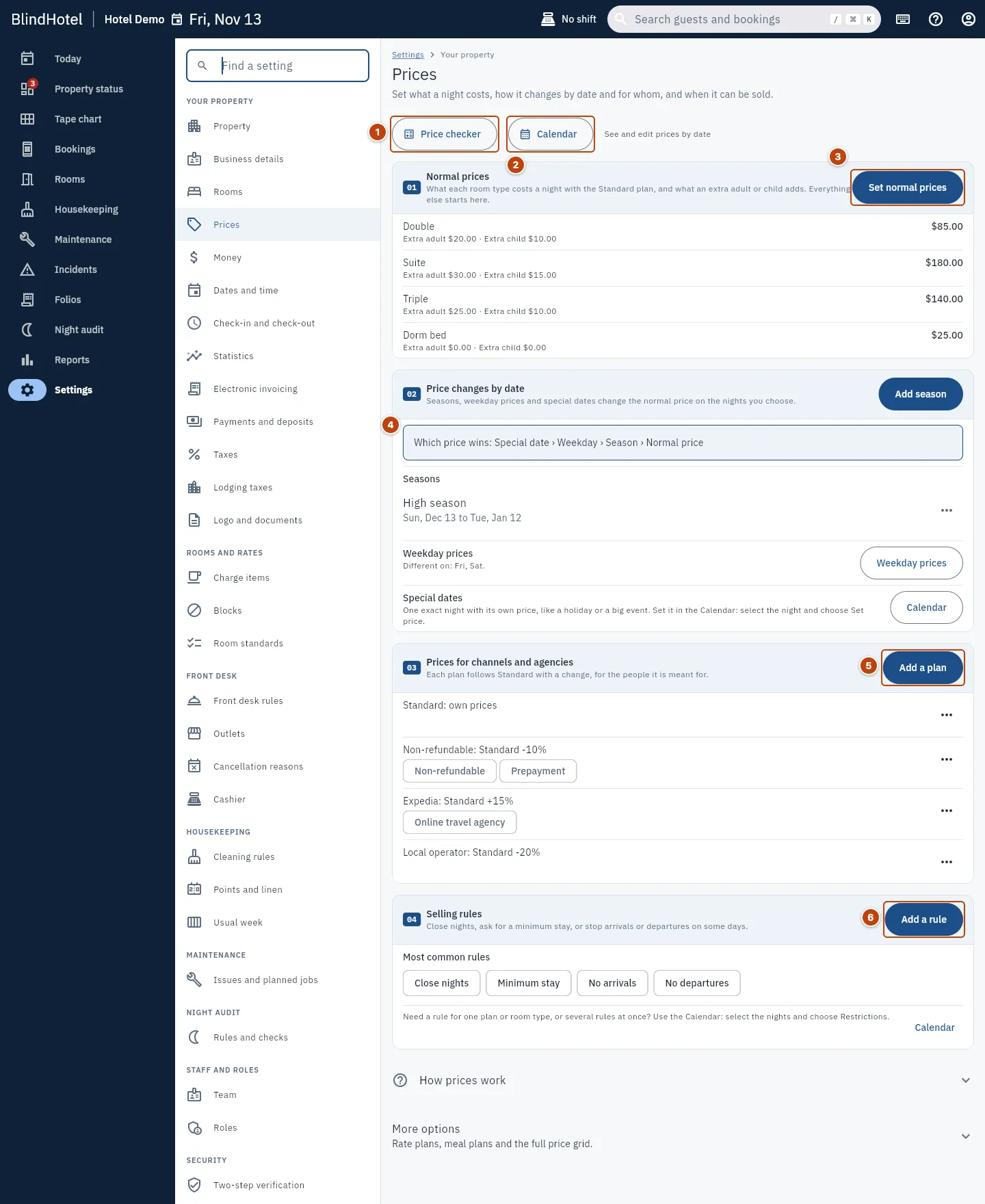
Parts of the screen
Section titled “Parts of the screen”- Price checker: opens a window that tells you what one night costs and how the price was built.
- Calendar: opens every price night by night, to see and change them by date.
- Normal prices (step 1): the price of each room type with the Standard plan, and what an extra adult or child adds. Everything else starts here.
- Price changes by date (step 2): seasons, weekday prices and special dates, with the line that says which price wins.
- Prices for channels and agencies (step 3): one line for each plan, written as a sentence such as Expedia: Standard +15%, with its conditions as small chips.
- Selling rules (step 4): closed nights, minimum stays and days with no arrivals or departures, with the most common ones as quick buttons.
Options and filters
Section titled “Options and filters”- The page has no filters. Each step is a card with one line that says what it is for, and its main button.
- Which price wins: Special date › Weekday › Season › Normal price is the rule that settles a night that has more than one price. The first one in the line that applies to the night is the price used.
- The small chips under a plan are its conditions: the meals, Non-refundable, the minimum nights, the booking sources, how many companies get it and the room types it is limited to.
Actions
Section titled “Actions”- Price checker (Owner, Manager): pick a night, a Room type, a Plan and the Adults and Children. The window shows the final price and How this price was built, step by step. Nothing is saved. See How your room price is calculated.
- Calendar (Owner, Manager): opens the price calendar. See The price calendar.
- Set normal prices (Owner, Manager): type the price of every room type, and the extra adult and extra child prices.
- Add season (Owner, Manager): gives a range of nights its own prices. See Seasons.
- Weekday prices (Owner, Manager): gives some days of the week another price, for example dearer Fridays and Saturdays.
- Add a plan (Owner, Manager): asks who the plan is for, how its price differs from Standard, and its conditions. See Create a rate plan for a channel.
- Add a rule (Owner, Manager): opens one window for a selling rule. Close nights, Minimum stay, No arrivals and No departures open the same window with that kind chosen. A preview shows what would change before you apply it. See Set stay restrictions.
- Next, Finish and Not now (Owner, Manager): drive the first-time guide. It appears only while the hotel has the Standard plan and no price. It leads through steps 1, 2 and 3. Not now closes it, and the four steps stay.
- Special dates are set in the Calendar: pick the night and choose Set price.
Colours, icons and badges
Section titled “Colours, icons and badges”- The round number on each card is the step, 01 to 04.
- A plan that follows another one is written as a sentence with the change, for example Standard +15%. A plan with its own prices says so.
- Managers only is a chip on a plan the front desk cannot pick by hand.
Phone and desktop
Section titled “Phone and desktop”- On a phone the four steps are one under the other, and the buttons fill the width.
- The Calendar opens full screen. On a phone it shows one room type and one plan at a time, as a list of nights.
Common questions
Section titled “Common questions”- Which price does a guest pay when a night has a season and a weekday price? The weekday price wins over the season, and a special date wins over both. How your room price is calculated shows an example.
- Where do I set the price of one exact night? In the Calendar: pick the night and choose Set price.
- Why is a plan written as a sentence? So you read it the way you would say it: Expedia costs the Standard price plus 15%. Open the plan to change it.
- Where did the rate grid go? Behind the Calendar button, with everything it could do.