Screen guide
The rate plan editor
At a glance
- Purpose
- Create a rate plan or change one: its price, its conditions and the bookings that start with it.
- Who uses it
- Owner
- Manager
- Where to find it
- Menu, Settings, then Prices. In step 3, tap Add a plan, or open the More actions menu of a plan and tap Edit.
The window where you make a rate plan in three short sections: who it is for, how its price differs from Standard, and its conditions.
The screen
Section titled “The screen”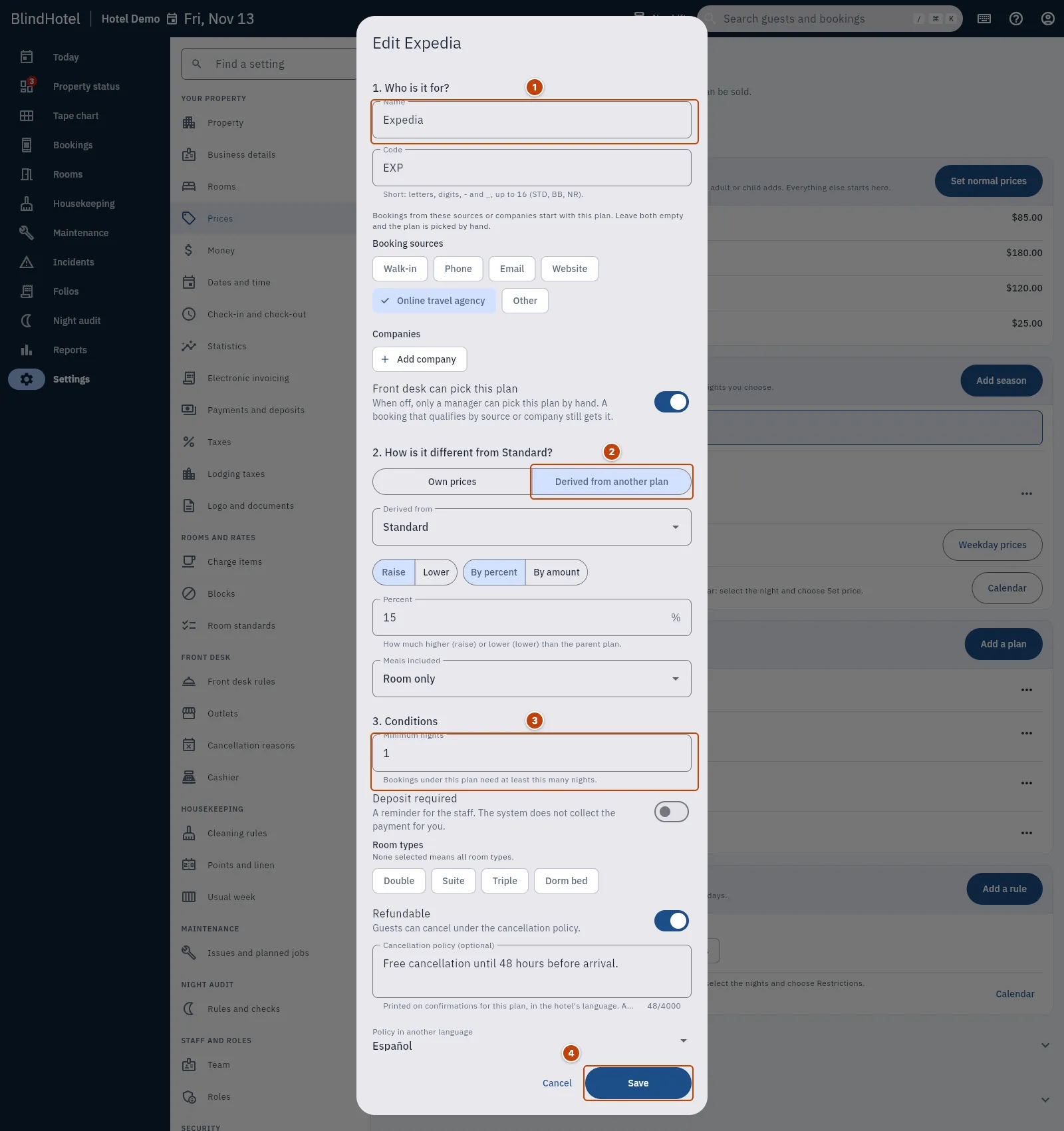
Parts of the screen
Section titled “Parts of the screen”- 1. Who is it for?: the Name staff and guests read, a short Code of up to 16 letters, digits, - and _ (it cannot change once the plan has bookings), then the Booking sources and Companies that get the plan, and Front desk can pick this plan.
- 2. How is it different from Standard?: choose Own prices or Derived from another plan. For a derived plan pick Derived from, Raise or Lower, By percent or By amount, and the number. Meals included says what the plan includes.
- 3. Conditions: Minimum nights, Deposit required and Room types, then Refundable and the Cancellation policy (optional) that is printed on confirmations.
- Save: keeps the plan.
Options and filters
Section titled “Options and filters”- Own prices: the plan has its own prices, set in the grid, in Normal prices…, Weekday prices… and the seasons.
- Derived from another plan: the plan costs its parent’s price, plus or minus a percent or an amount. It follows the parent night by night.
- Raise and Lower: whether the plan costs more or less than its parent.
- By percent and By amount: the difference is a percent of the parent’s price, or a fixed amount for every night.
- Room types: none selected means all of them.
Actions
Section titled “Actions”- Add a plan: opens the editor with nothing filled in.
- Edit: opens the editor for a plan that exists.
- Add company: picks a company that gets this plan. Its bookings start with it.
- Save: saves the plan. The prices of a derived plan change at once.
- Cancel: closes the editor and changes nothing.
Colours, icons and badges
Section titled “Colours, icons and badges”- Standard is the plan every hotel keeps. You can rename it, but not delete it, and it cannot be derived from another plan.
- In step 3 a plan shows its conditions as small chips: the meals, Non-refundable, the minimum nights, the booking sources, how many companies get it and the room types it is limited to.
- Managers only marks a plan the front desk cannot pick by hand.
- Non-refundable marks a plan that guests cannot cancel for free.
Phone and desktop
Section titled “Phone and desktop”- On a phone the editor is a full page with the same three sections, one under the other.
- The two choices under Derived from share a line on a desktop and wrap to two lines when the screen is narrow.
Common questions
Section titled “Common questions”- Why does the plan that others follow not offer Derived from another plan? A plan can follow one parent only, and only one level deep. A plan with plans derived from it keeps its own prices.
- What does Deposit required do? It is a reminder for the staff. The app does not collect the payment for you.
- Why can’t I change the code? The plan already has bookings. Change the name instead.