Screen guide
The Room standards screen
At a glance
- Purpose
- Say what a clean room of each room type holds, so the trolley list for the day is right.
- Who uses it
- Owner
- Manager
- Where to find it
- Menu, Settings, then Room standards. The three-dot menu of the housekeeping board opens it too.
What a ready room of each type contains: beds, linen, towels and extras. The housekeeping trolley list is worked out from it.
The screen
Section titled “The screen”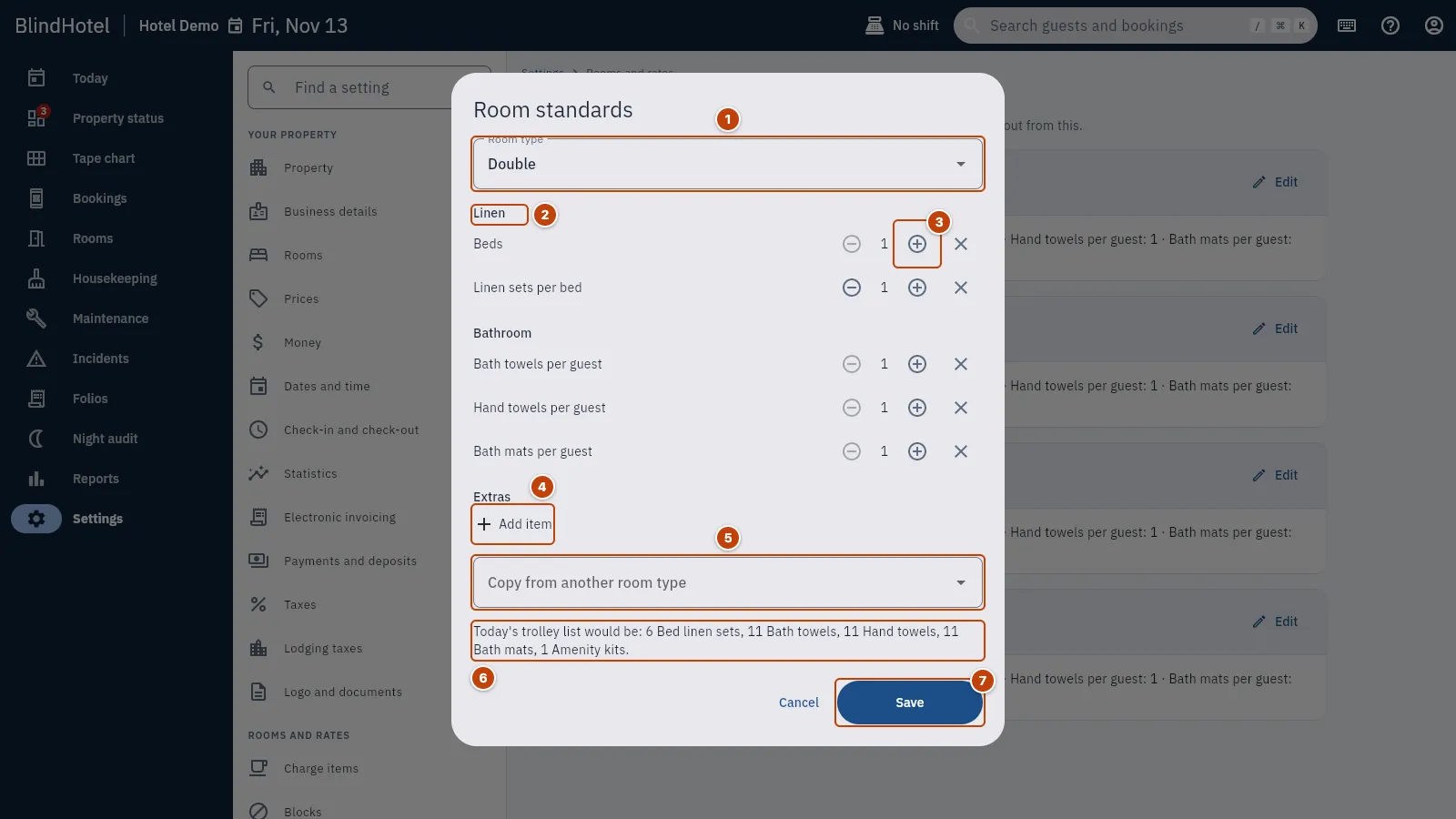
Parts of the screen
Section titled “Parts of the screen”- Room type: the room type you are editing. Pick another one to edit its standard.
- Linen: Beds and Linen sets per bed.
- More Beds: the plus button of an item. Each item also has a minus button and a counter.
- Add item: brings back an item you took out, for example the Amenity kit.
- Copy from another room type: starts this standard from another room type’s.
- Today’s trolley list: what the trolley would carry today with the numbers on screen.
- Save: keeps the standard.
Options and filters
Section titled “Options and filters”- The page lists a card for each room type with its numbers in one line, for example Beds: 1 · Linen sets per bed: 1 · Bath towels per guest: 2.
- The items are in three groups: Linen, Bathroom and Extras.
Actions
Section titled “Actions”- Edit (Owner, Manager): opens the editor of that room type.
- More Beds and Fewer Beds (Owner, Manager): change a number by one. The same buttons exist for Linen sets per bed, Bath towels per guest, Hand towels per guest and Bath mats per guest.
- Remove Amenity kit and Add item (Owner, Manager): take an item out, or bring it back.
- Copy from another room type (Owner, Manager): fills this room type with the numbers of another. A line says Copied from the room type. Nothing is kept until you tap Save.
- Save (Owner, Manager): keeps the standard. The change is in the next trolley list.
Colours, icons and badges
Section titled “Colours, icons and badges”- The line Today’s trolley list would be updates as you change the numbers, so you can see the effect before saving.
Phone and desktop
Section titled “Phone and desktop”- The editor is a window on every screen, with the groups one under the other.
- The plus and minus buttons are large so they are easy to tap.
Common questions
Section titled “Common questions”- Why does the page say there are no room types? Add them first. Each room type you add gets a standard here. See Set up rooms.
- Does a change affect rooms already cleaned? No. It changes the trolley list from the next one on.
- What is the trolley list? The linen and towels a housekeeper loads for the day, worked out from the rooms to clean and these standards. See The housekeeping board.