Process guide
Credit and debit notes
Time2 minutes
- Owner
- Manager
- Front desk
- Night audit
DifficultyMedium
Change an invoice that was already accepted: a credit note when the guest pays less, a debit note when the guest pays more.
Purpose
Section titled “Purpose”An accepted invoice cannot be edited. When the folio changes afterwards, the correction travels as a new document that refers to the invoice. This keeps the tax authority’s records and yours equal.
Ingredients
Section titled “Ingredients”- Permissions: Owner, Manager, Front desk or Night auditor.
- State: The folio already has an Accepted invoice and electronic invoicing is on.
Expected result
Section titled “Expected result”The Fiscal tab lists a Credit note or a Debit note that refers to the invoice. It is Queued or Sent, and then Accepted.
- Make the change on the folio as you always do: discount or reverse a charge, or add a charge that came late. A closed folio first needs an Owner or a Manager to open it with Reopen folio (two-step sign-in), and it is closed again after the change. If money goes back to the guest, give it with Refund.
- Go to Folios and open the Fiscal tab.
- Find the note in the list. It appears by itself after the change, and the invoice shows it under Credit and debit notes.
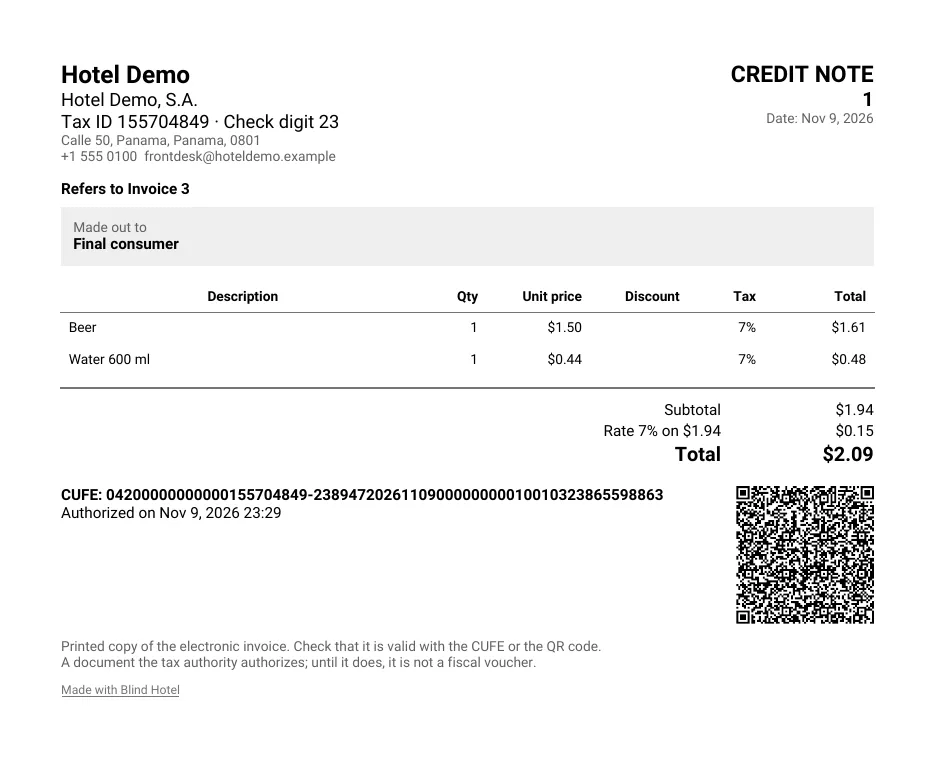
- Tap the note to read it: Refers to names the invoice, and the items and the Total are the change.
Check your work
Section titled “Check your work”The note reaches Accepted and shows the Authority code. The invoice’s window lists the note under Credit and debit notes.
To give the guest the copy, tap the note and then Print or Share PDF. The page says Refers to and the invoice’s number, and lists the change (here, the discount), not the whole bill.
What next
Section titled “What next”If a note says Rejected, see Fix a rejected invoice. If the whole invoice was a mistake and fewer than seven days have passed since it was accepted, an Owner or Manager can tap Annul on it.
Considerations
Section titled “Considerations”- You do not make a note by hand: the app makes it from the postings made after the invoice. A discount or a reversed charge makes a credit note; a charge that came late makes a debit note. A refund only gives money back and does not change the bill, so it makes no note by itself.
- A note that has not been sent yet takes the new postings too, so several changes in a row travel together.
- To annul an invoice that has notes, annul the notes first.
- After the seven days to annul, correct with a credit note instead.