Process guide
Take a payment
Time2 minutes
- Owner
- Manager
- Front desk
- Night audit
DifficultyCareful
Take money from a guest and put it on their folio.
Purpose
Section titled “Purpose”A guest pays at the desk: a deposit before they arrive, the balance when they leave, or part of the bill during the stay. The payment goes on the folio and, for cash, on your cashier shift.
Ingredients
Section titled “Ingredients”- Permissions: to take payments.
- Information: the guest’s name, room or booking number, and the amount.
- State: a cashier shift is open if the method is cash or another one counted at close. The folio is open.
Expected result
Section titled “Expected result”The payment is on the guest’s folio, the balance is lower by that amount, and a receipt is ready if you want one.
-
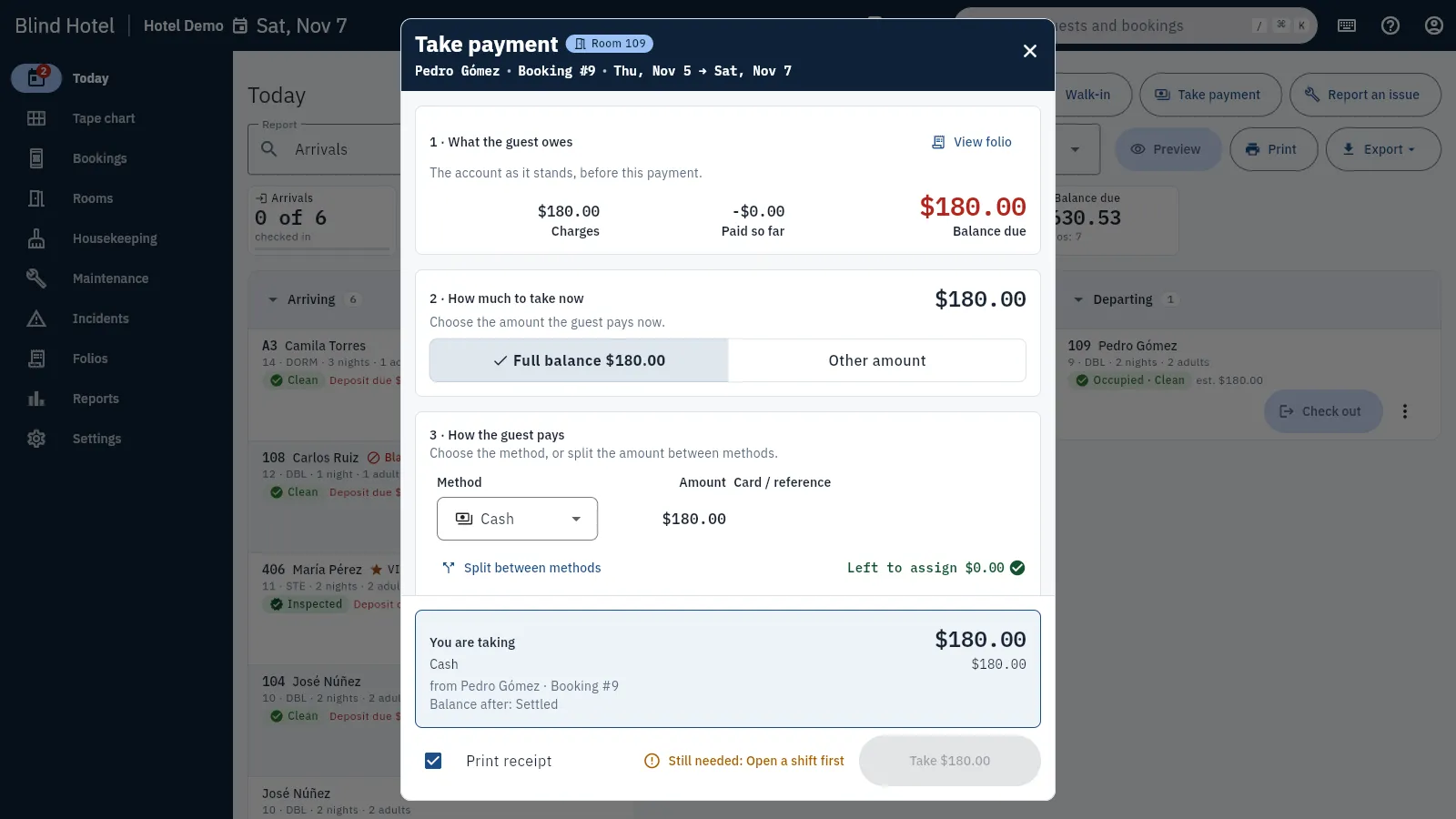
Go to Today and tap Take payment.
-
Type the guest’s name, room or booking number in Guest, room or booking #. Then tap the guest.
-
Look at What the guest owes. It shows Charges, Paid so far and Balance due.
-
Under How much to take now, choose the amount. For a smaller amount, choose Other amount and type it in Amount.
-
Under How the guest pays, choose the Method.
-
For a card, type only the last 4 digits. Never type the whole card number.
-
To pay with two methods, tap Split between methods. Give each method its part until Left to assign is zero.
-
If the app says Open a shift first, tap Open shift. Then go on with the payment.
-
Read the box You are taking. Check the amount, the method and the balance after.
-
Leave Print receipt ticked if the guest wants a paper receipt.
-
Tap the button at the bottom: Take and the amount.
Check your work
Section titled “Check your work”- A message says Payment taken with the amount.
- The receipt opens if you left Print receipt ticked.
- Open the folio: the payment is a new line and Balance due is lower by that amount.
- Your cashier shift shows the money, if the method goes on a shift.
What next
Section titled “What next”- If the message We couldn’t confirm this payment. appears, it may have gone through. Do not take it a second time. See A payment was not confirmed.
- If the guest pays more than they owe, the window says Guest will be in credit. Give the money back with Refund, under More actions in the folio. See The folio.
- A payment is never edited or deleted. To fix a mistake, see The folio.
- For every part of the window, see The payment window. For the cash count, see Your cashier shift.
Considerations
Section titled “Considerations”- To skip step 2, start from the guest instead: Pay on their row, Take payment in their folio, or Take deposit in their booking. The key P works too.
- A split pays all its methods together, or none of them.
- Cash, cards and wallets can go on your cashier shift, to be counted when you close it.
- The card field takes only the last four digits: it keeps four and drops the rest.