Screen guide
The Property status screen
At a glance
- Purpose
- See in one look what needs a manager before it becomes a problem.
- Who uses it
- Owner
- Manager
- Where to find it
- Menu, Property status
One page that says how the hotel is doing right now, in six cards, each with a level: all good, watch, or needs attention.
The screen
Section titled “The screen”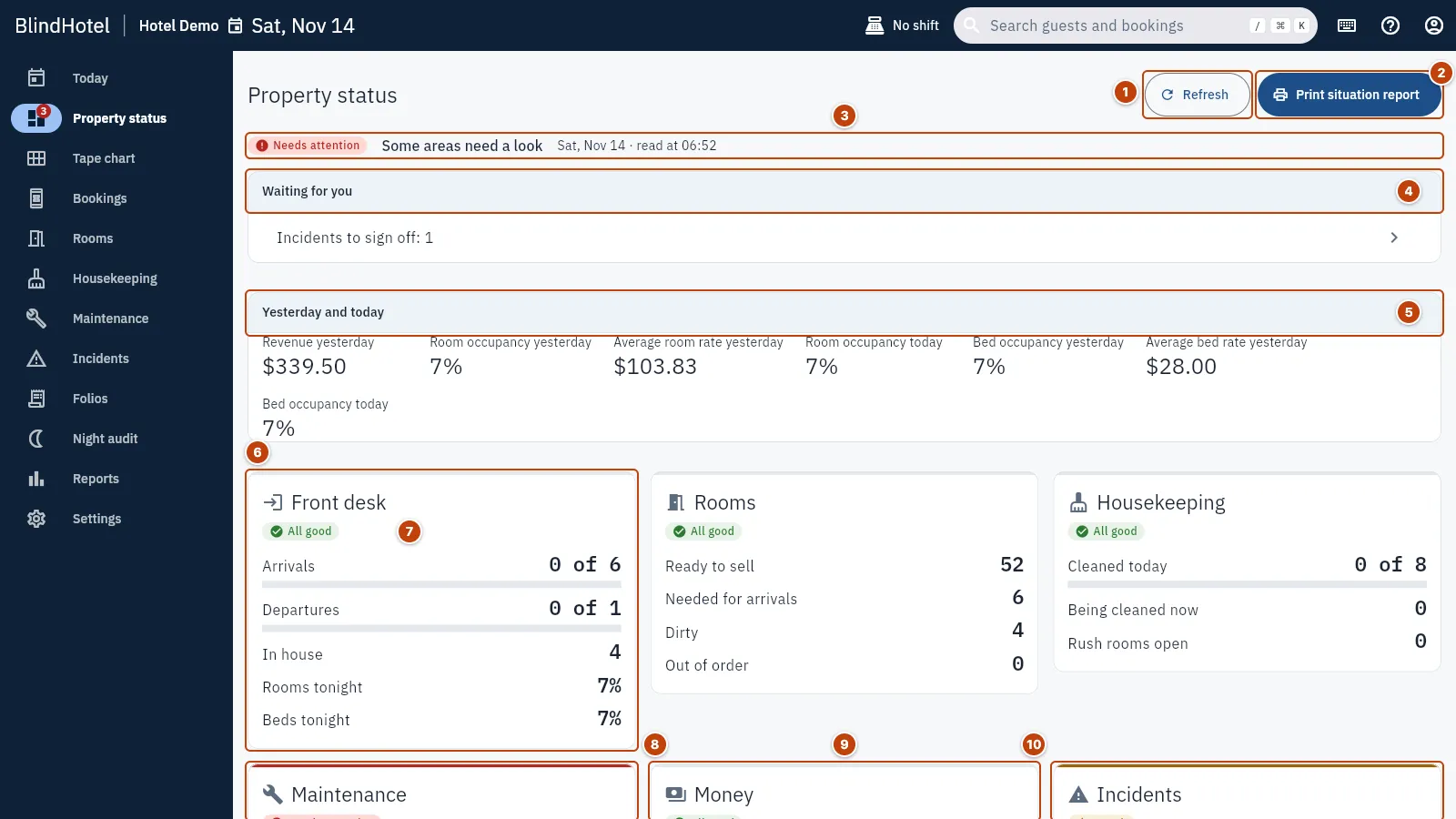
Scroll down for the Shift notes, under the cards. They are described under Options and filters.
Parts of the screen
Section titled “Parts of the screen”- Refresh: reads everything again now. The page also refreshes by itself every minute and when something changes.
- Print situation report: one page with every card, the open incidents and the shift notes. It asks the language of the paper first.
- The headline: a tag with the worst level of the six cards, a sentence (Everything is on track or Some areas need a look), and the day and the time the page was read.
- Waiting for you: what is waiting for you to approve or sign off, such as Cashier shifts waiting for approval and Incidents to sign off. It is not there when nothing waits. Tap a line to go to it.
- Yesterday and today: Revenue yesterday, Occupancy yesterday, Average room rate yesterday and Occupancy today. Where it can, each adds the same day last week. Not closed yet means the night audit has not closed yesterday. If you have dorms, the rooms and the beds are told apart: after the revenue come three tiles for the rooms (Room occupancy yesterday, Average room rate yesterday, Room occupancy today) and three for the beds (Bed occupancy yesterday, Average bed rate yesterday, Bed occupancy today). A hotel with only dorms has the tiles of the beds alone.
- Front desk, Rooms and Housekeeping: the first row of cards. Each has a title, a level tag and a few lines of figures. A red number is a figure that needs you. On Front desk, Occupancy tonight is the share of your private rooms that have a guest. If you have dorms it becomes two lines, Rooms tonight and Beds tonight, and a hotel with only dorms has Beds tonight alone.
- Level tag: All good, Watch or Needs attention. A card that is not all good also has a coloured bar along its top.
- Maintenance: open issues, urgent ones, issues with a guest in the room, rooms off sale, waiting for parts and the oldest open issue.
- Money: cashier shifts open, shifts left open from an earlier day, variances waiting approval, and the balance due on open folios.
- Incidents: open incidents, accident or security ones, and the ones with a follow-up.
Options and filters
Section titled “Options and filters”- Shift notes (below the cards): the notes the team left. The form under the notes adds one: write it, tick Important if it cannot wait, tap Add note. Each note has Archive, and the message that follows has Undo for a few seconds. Archive at the top right of the section opens the archive, where you can search old notes.
- Mark 2 notes as read (the number changes): shows while some notes are new. It marks them all.
- Show all: the notes list shows the first few. The button shows the rest.
- Tap a card: opens its screen: Today for Front desk, Rooms, Housekeeping, Maintenance, Folios for Money and Incidents. A card that leads somewhere you may not go does not open.
Actions
Section titled “Actions”- Refresh (Owner, Manager): asks the server again.
- Print situation report (Owner, Manager): choose the language and print or save the page.
- Open the night audit (Owner, Manager): a red box at the top says the automatic night audit failed, is held or is late. Its button opens the night audit.
- Waiting for you (Owner, Manager): a line goes to the cashier shifts waiting for approval, or to the open incidents.
- Add note and Archive in Shift notes (Owner, Manager): write the team’s notes and archive the ones that are done.
Colours, icons and badges
Section titled “Colours, icons and badges”- Green tag with a check, All good: nothing here needs you.
- Amber tag with a triangle, Watch: something is building up.
- Red tag with an exclamation mark, Needs attention: act now.
- Red figure inside a card: the line that made the card worse.
- The bar along the top of a card is thin and plain when all is good. An amber or red bar means the card is not all good.
- Front desk is red when a guest is past their departure date. It is amber after check-out time while departures are still to do, or when an arrival from an earlier day has not come.
- Rooms is amber when fewer rooms are ready than today’s arrivals need, and red once check-in time has passed.
- Housekeeping is amber with a rush room open, and red when arrivals are waiting for a room.
- Maintenance is amber when the oldest open issue is seven days old or more, and red with an urgent issue or a guest in the room affected.
- Money is amber with variances waiting approval, and red when a cashier shift was left open from an earlier day.
- Incidents is amber with any open incident, and red with an open accident or security one.
Phone and desktop
Section titled “Phone and desktop”- The cards stand in up to three columns. On a tablet there are two, and on a phone one under the other.
- There are no keys of its own. / or Ctrl+K (Cmd+K on a Mac) still searches, and ? lists the shortcuts.
Common questions
Section titled “Common questions”- Why is Property status not in my menu? Only the owner and the managers have it. Other roles start on their own page (for example Housekeeping, My day or Maintenance), on Today, or on the page they chose in Start page.
- Why is a card amber when nothing looks wrong? Read its lines. The red figure shows what moved the level.
- Why does Revenue yesterday say Not closed yet? The night audit has not closed yesterday. Run it or ask the night auditor.
- Why do I see Rooms tonight and Beds tonight instead of Occupancy tonight? Your hotel has dorms, so the page counts the private rooms and the dorm beds apart.
- Why is there no Rooms line, only Beds tonight? Your hotel has no private rooms to sell, only dorms. A figure for rooms would read 0% for ever, so the page leaves it out.
- How fresh is this? The line under the title says the time it was read. Refresh reads it again.